
AI splits my expenses with a few scribbles and prompt
A personal app exploring AI engineering, secure authN/authZ, and durable serverless workflows
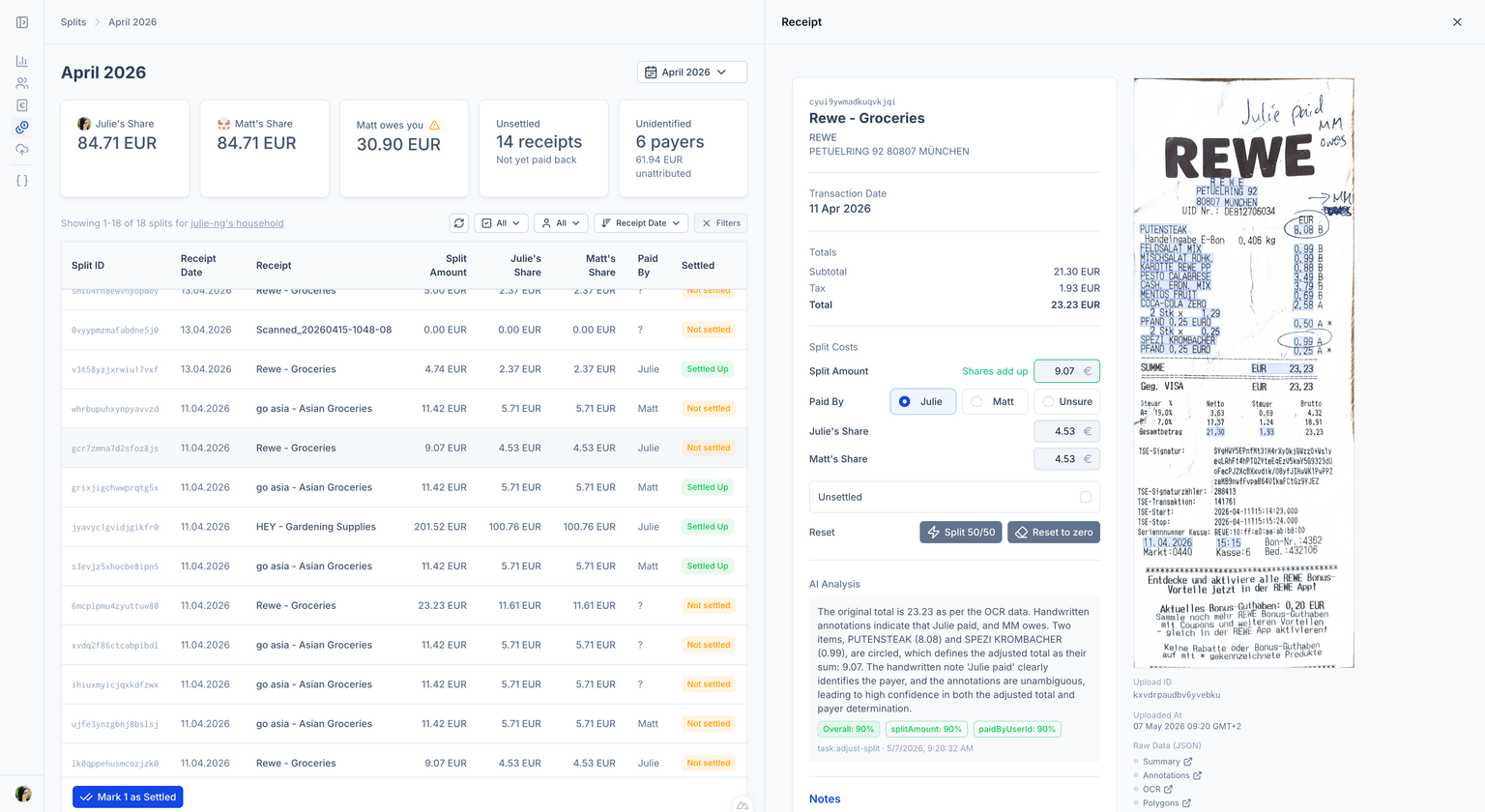
Example AI Analysis
The original total is 23.23 as per the OCR data. Handwritten annotations indicate that Julie paid, and MM owes. Two items, PUTENSTEAK (8.08) and SPEZI KROMBACHER (0.99), are circled, which defines the adjusted total as their sum: 9.07.
— example LLM reasoning, 90% confidence
Architecture
Distributed Cloud Stack
I leveraged my Azure expertise for infrastructure, but chose to explore other PaaS and SaaS offerings.
Serverless
Nuxt Framework
Full-stack framework: Vue + Nitro with hybrid SSR and client hydration, file-based routing for API endpoints.
Vercel Functions
Each API route deploys as its own serverless function and independentlly auto-scaled.
Trigger.dev
Durable async workflow orchestration for the agentic pipeline.
Azure AI Services
Azure Document Intelligence
OCR via the prebuilt-receipt model - structured fields, line items, and bounding boxes.
GPT-4o
Vision model for handwritten annotation detection (circles, strikethroughs, initials).
GPT-4o-mini
Text-only model for receipt normalization and the agentic split-adjustment step.
Identity & Data
GitHub OAuth
Single Sign On for human users via nuxt-auth-utils.
Supabase
Postgres database, accessed through the transaction-mode pooler for serverless compatibility.
Azure Blob Storage
Receipt + thumbnail storage. Direct client uploads and reads via short-lived, scoped SAS tokens.
Architecture
Multi-layer LLM pipeline
Decision: Orchestrator - mostly synchronous (link to Google paper) Craftsmanship: divide up the tasks. Automate up to 99%. Give human clear signal and ability to override.
Step 1
Upload
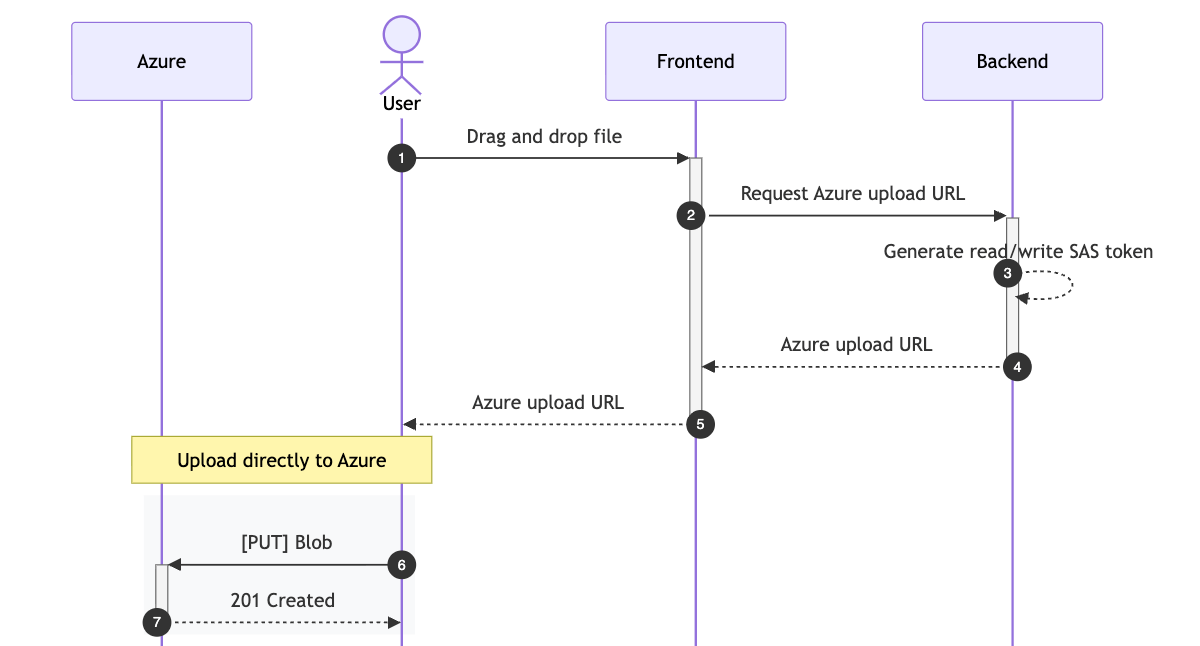
Drag and drop UI uploads directly to Azure Blob storage, without funneling files through app for better performance and user experience.
Step 2
Extract Text (OCR) Azure Document Intelligence
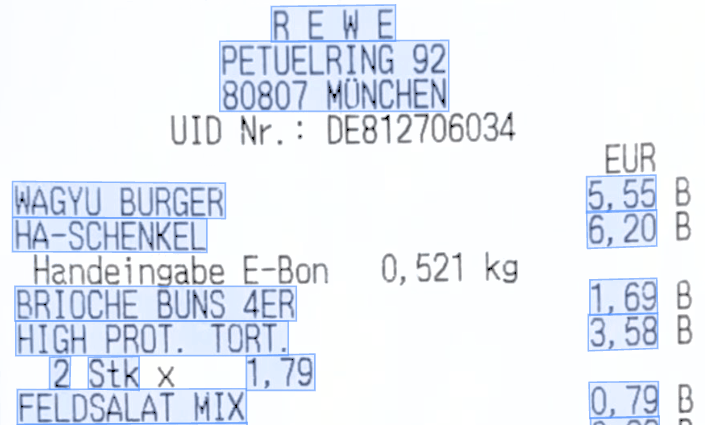
A worker sends a read-only URL for Azure Document Intelligence to directly fetch and analyze the image. Azure to Azure traffic remains on the Microsoft backbone, preserving performance.
The Azure prebuilt-receipt model extracts line items, price, total, date, vendor, etc.
Step 3
Detect Handwritten Annotations gpt-4o
Instead of training a custom model, OCR results and blob image are sent to gpt-4o to process according to my conventions:
- Handwritten initials → indentify payer.
- Handwritten numbers → receipt total including cash tip.
- Strikethroughs → remove line item from receipt total.
- Circles → include these line items OR this is the user determined total.
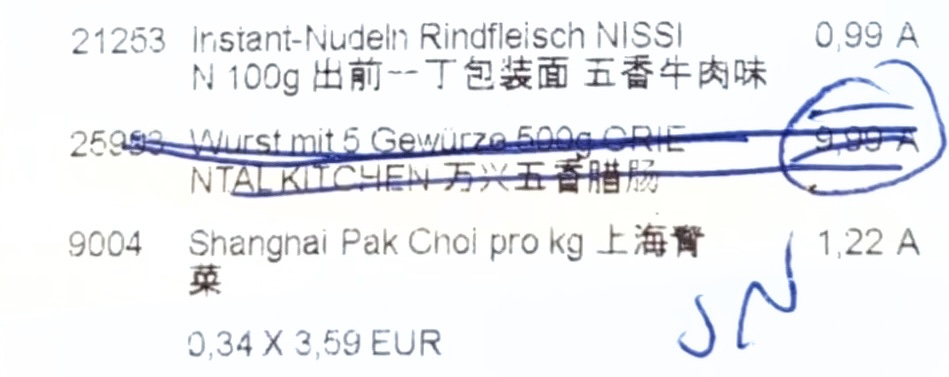
Example: Strikethroughs removes the line item from the receipt total. Initials indicate who paid.
Step 4
Normalize Contents gpt-4o-mini
Azure Document Intelligence results can vary depending on receipt type and photo quality if the receipt is faded or slightly crumpled. The cheaper gpt4o-mini is used to resolve these issues and normalize fields, as well as consolidate franchised stores into umbrella parent company name.
Generate a concise title in English in the format: "<merchant name> - <category>" where <category> summarizes what was purchased (e.g., "Groceries", "Dinner", "Office Supplies").

For the merchant name, use the everyday colloquial name — NOT the legal entity name, for example:
- "Rewe Markt GmbH" → "Rewe"
- "dm-drogerie markt GmbH + Co. KG" → "dm"
Step 5
Create Split and Assign Payer gpt-4o
Another worker decides on the split amount and assigns the payer based on OCR and annotation analyses. Users can optionally provide custom instructions to LLM to identify payers.
In this way, users have 100% control on the trade-off between privacy and automagic.
Handwritten initials take precedent. But if none are found, this information can be used to identify payer:
- Alice tends to pay with EC or Girocard.
- Bob tends to pay with "Visa Debit" or Mastercard ending in 1234.
Security
Authentication
Verifying two security principal types — humans and headless workflows
GitHub SSO for Users
Users log in via GitHub Single Sign-On (SSO). Session cookies are httpOnly, encrypted and include a message authentication code (MAC) signature for integrity.
Session information includes
| Property | Description |
|---|---|
userId | User's ID |
householdId | Used for Authorization as all resources roll up to a household. |
securityPrincpal | e.g., {user:userId} which is used for tracking changes to receipts, splits, etc. |
Token Authentication for Tasks
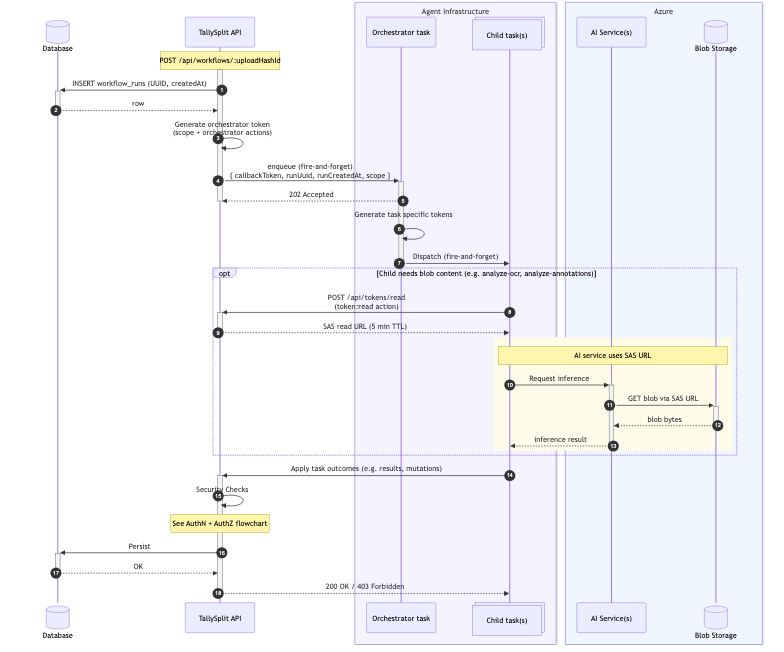
Each task authenticates against Tally Split APIs with a hash-based message access code (HMAC) token. Incoming requests require
Authorization: Bearer <callbackToken>
X-Workflow-Run-UUID: <runUuid>
X-Task-Id: <taskId>
Authentication Steps
- Look up workflow run by UUID.
- Compare run createdAt date and compare with global expiry configuration.
- Check allowed task IDs.
- Verify integrity by recomputing token based on values from database.
Security
Designing granular HMAC Tokens
Custom HMAC tokens are overengineered for a personal app. The enterprise architect in me, however, enjoys security modelling and breaking my own designs.
I'm excited by AI but also mindful that our security models need to adapt - and even small applications should provide guardrails, to protect user data from unintended actions.
How I work
Built with AI
Product quality and experience that only human judgment can provide
Many models, by design.
I use multiple models for distinct purposes. For some topics, I use both Gemini and Claude simultaneously.
| LLM | Purpose |
|---|---|
| Gemini | Architectural sparring partner. Googler. |
| Claude | Opus (1M) is my daily driver. |
| GitHub Copilot | Code reviews on Pull Requests. |
This way, my decisions rest on multiple perspectives. And I'm less likely to follow one model down a rabbit hole.
For writing code, Claude understands me best, letting me lead but still challenging when needed. I prefer pair-programming in a tight loop, because letting LLMs run unsupervised always made more cleanup for me, not less.
I design. Claude builds.
Claude writes the code — but only what I tell it to. The pipeline, the authorization rules drawn from business logic, the token lifecycles: those I design.
Experience
Lessons Learned
gpt-4o meant no custom model needed
I thought handwritten annotations needed a custom model. Turns out gpt-4o with a short prompt of my conventions got to value fastest — startup mindset FTW.
"Handwritten" means many things
I tried collapsing OCR and annotation detection into one step. Several LLMs promised handwritten annotations — but Mistral OCR read "handwriting" as letters only. One day wasted.
AI is not hard. Engineering is.
AI engineering is cloud engineering on steroids. Performance, reliability, UI/UX, scalable code — each hard alone. Now, you need all at once.
When AI gets it wrong, not if.
Automating a cost split seems simple. But OCR misreads. LLMs are non-deterministic. Humans forget. So, how do I build APIs and UX that put humans in control of semi-autonomous workflows?